How To Order on our Website

We will show you below how to place an order on this website. If you are a new or an existing website customer, the process is quite easy.

Please note that in June 2022, we changed to a new website system. This means that you can’t log in with your previous password. You have to click on “Forgotten password?” to get a link by email which will allow you to log in with your email address and to create a new password. Your account details will still be there, but not your order history because technically, it was not possible to carry it over to the new website.
Logging in or Creating a new account

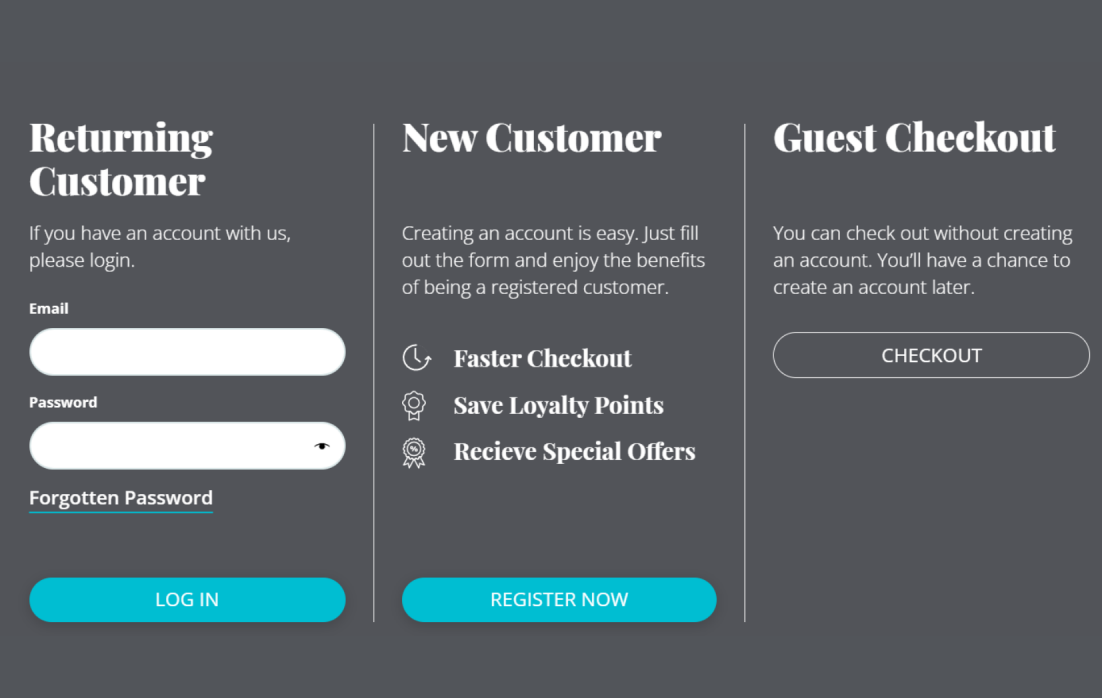
If you have placed orders over the website with us before, you can log into your account with your login details. You either click "Log in" top right-hand corner of any page and enter your email address and password. Or you fill your shopping cart first, and log in during Checkout.

If you are a NEW customer: You either click on "Log in" on the top right-hand corner and select "Register now" in the "New Customer" column. Or you fill your shopping cart first, and log in during checkout. Again, you can register as a New Customer or , or you select "Checkout" in the "Guest Checkout" column.

Creating an account is useful as your contact and delivery address details will be stored on the website so that the next time you log into our website with the password you chose, you will be able to checkout much faster. You will also be able to gather Loyalty Points over time if you check out as a registered customer.

Login in page Burren Smokehouse

This is how you place an order

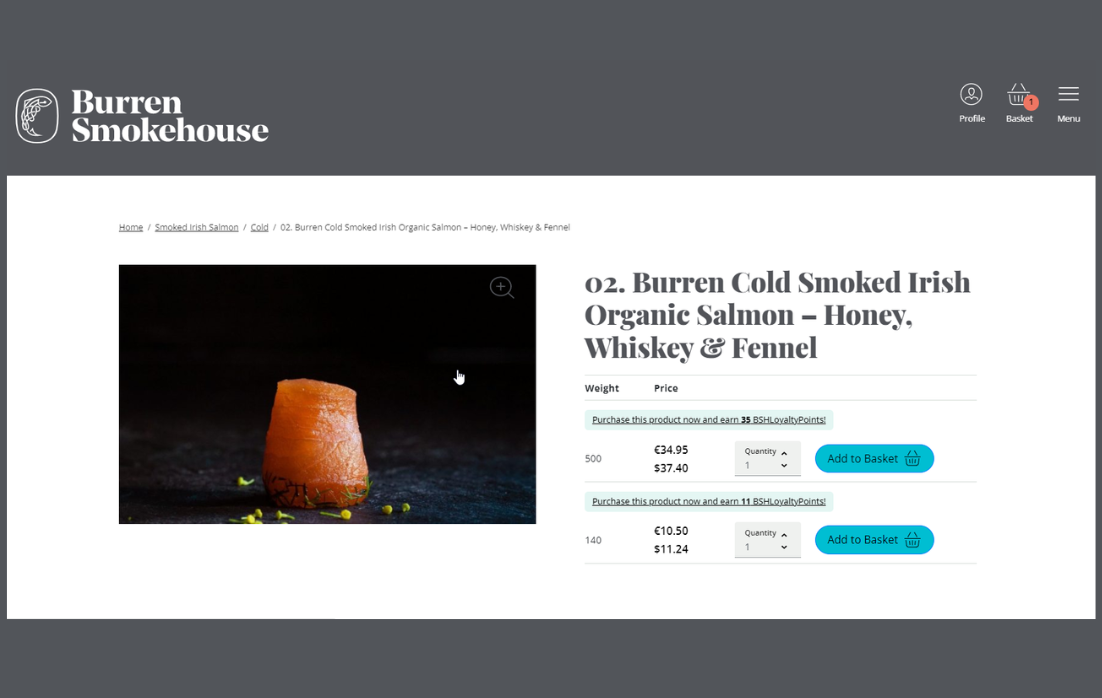
Start by going to the SHOP section: click onto the three horizontal lines on the top of the page, and then into one of the categories under the header SHOP. Select a product by clicking on a picture of one of the displayed products to see details and price(s).

Once the product is up on the screen, you can scroll down a bit and find a short description of the product. Under "Description", you will see more detailed information. There is a lot more information in the tabs underneath which will open up when you click on them, like "Dispatch & Delivery".

Ordering smoked salmon process 0 at Burren Smokehouse
Selecting products

Adjust the quantity if needed, and click on "Add to Basket" next to the products. When you are ready to submit your order, click on the button with the basket symbol on the very top right-hand corner of the page.

The prices are displayed in Euros. You can check your exchange rate on websites like FXTop.com.

Buying smoked Salmon online Burren Smokehouse

On the next page opening up, you can adjust the quantities and remove items completely. If you increase or decrease the quantity of items, please click on the blue link "UPDATE" next to the quantity box to validate.

At this stage, you can insert a coupon code to take advantage of our newsletter offers for example. Once you put in the correct coupon code, click "APPLY" and the discount will be applied.

Any loyalty points you have accumulated will appear here, ready to be redeemed!

Next, click on the black "PROCEED TO CHECKOUT" button.
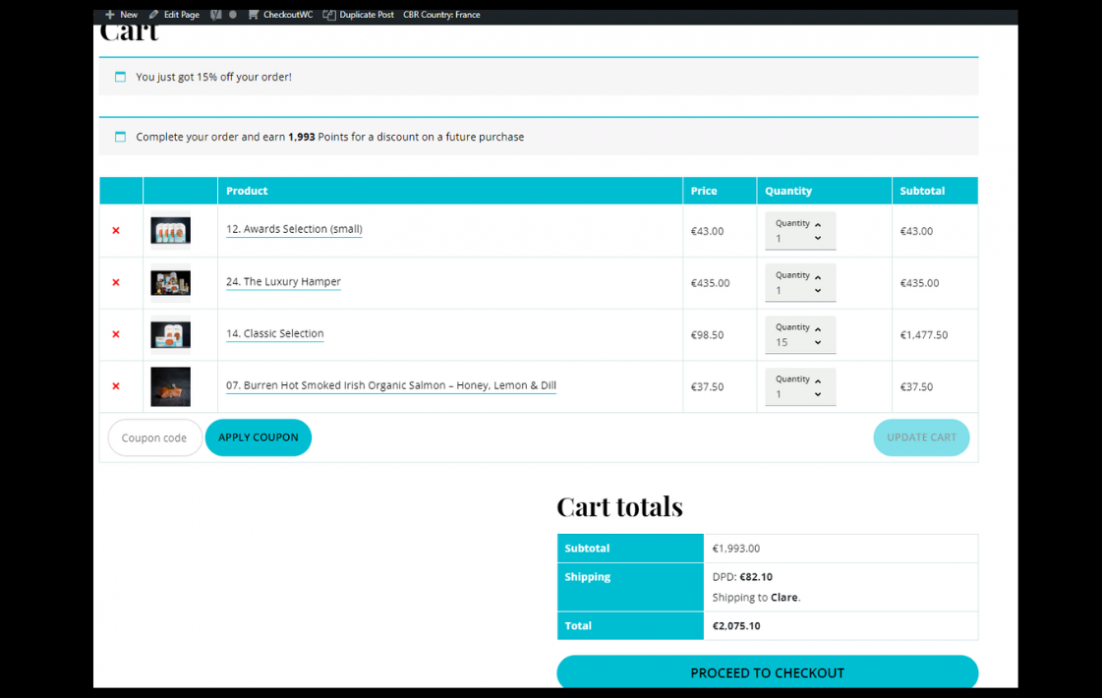
Buying online smoked salmon Burren Smokehouse

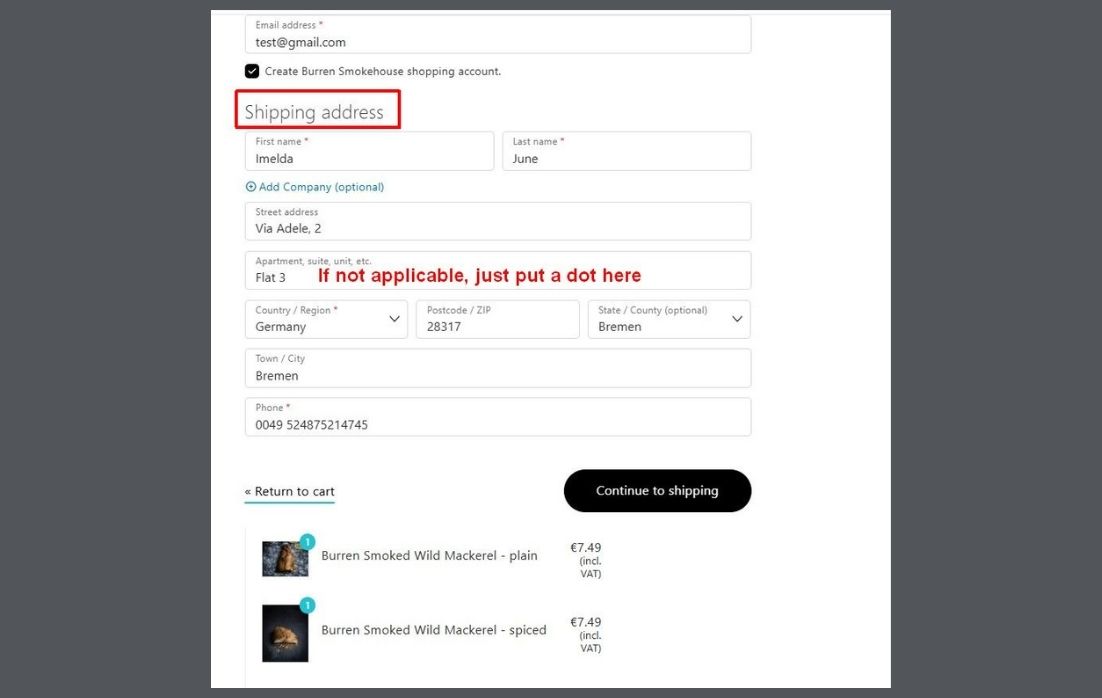
On this page, you enter the delivery address of where you want the order shipped to. This shipping address will also determine the freight costs. Click "Continue to Shipping".

Ordering smoked Salmon process 2 Burren Smokehouse

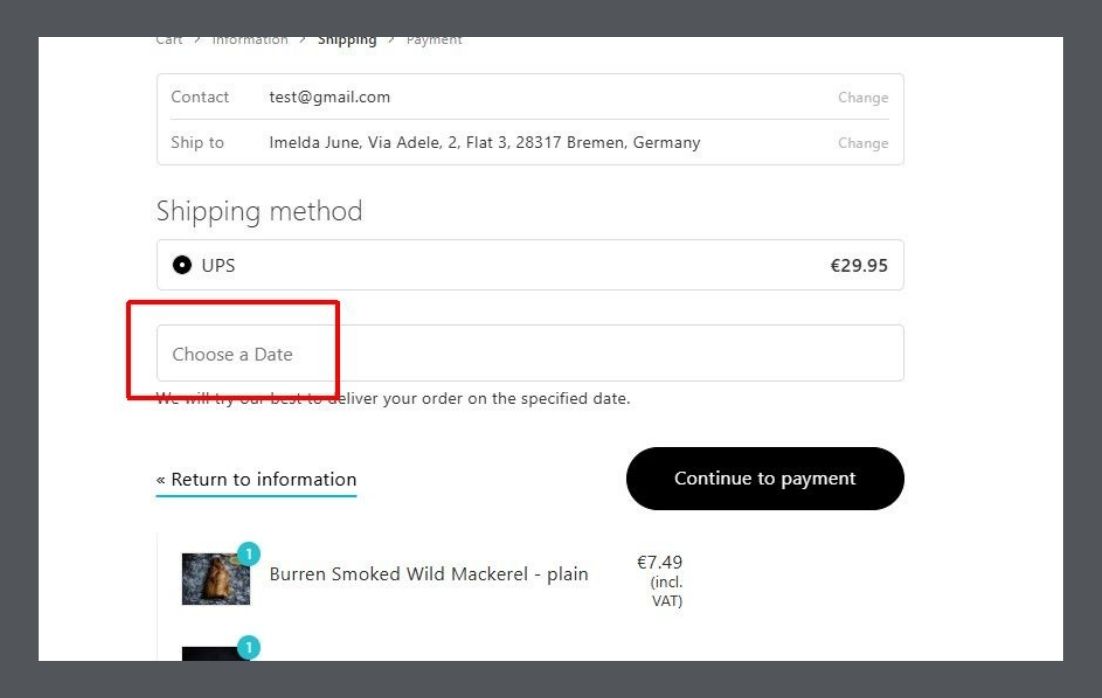
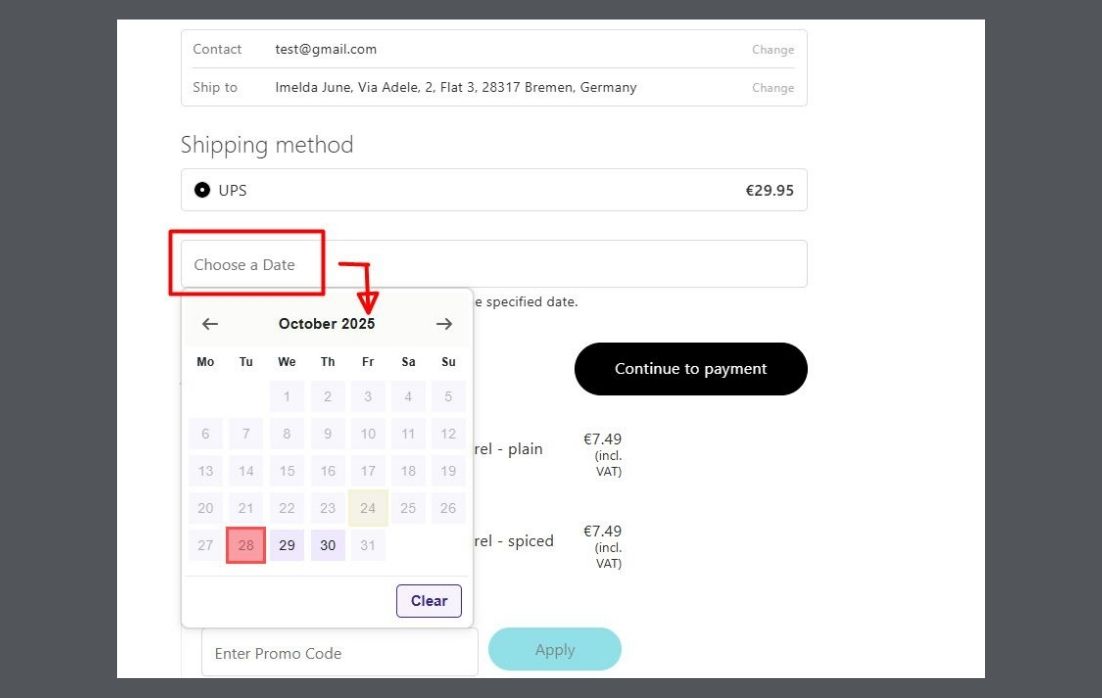
Select a delivery date. The purple dates are the ones that you can select from. The red or greyed out dates are not available to select. Once you click on a date, it will appear in the box above the calendar.

For more information on delivery times etc please go to Important Info on Ordering and Shipping

Click on "Continue to Payment".

Ordering smoked Salmon process 3a Burren Smokehouse
Ordering smoked Salmon process 3b Burren Smokehouse

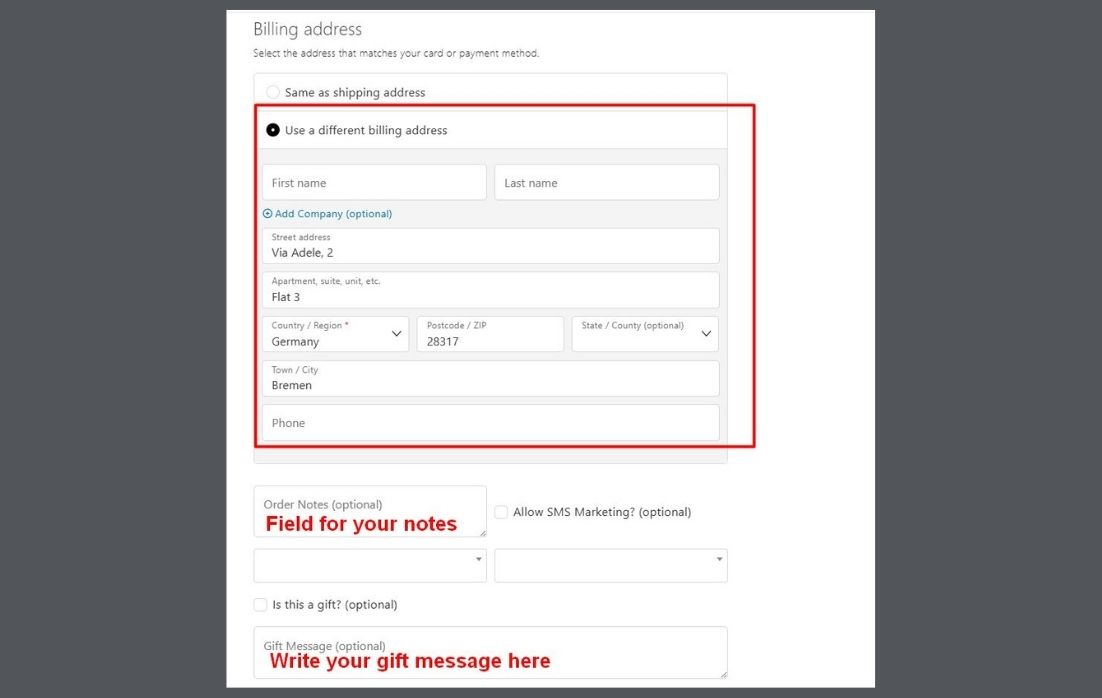
On this page, you can

- edit the delivery address (again) if needed.

- pay as normal with your credit or debit card (Visa or Mastercard).

- enter a billing address if different from the shipping address. To do so, please tick the box "Use a different billing address". - The Billing address would for example be your own address.

- enter notes for us regarding the order.

- add a gift message for the recipient in the box marked "Gift message (optional)".

Once you click and of course read the Terms & Conditions, you can complete the order.

Ordering smoked Salmon process 4 Burren Smokehouse
Ordering smoked Salmon process 5 Burren Smokehouse
Burren Smokehouse smoked Irish Organic Salmon with Seaweed

Sign up for our newsletter...

... and receive a 15% welcome discount. Get exclusive insights, news, delicious recipes and most importantly - our exclusive offers!
Book Your Experience